Posted in Augmentative and Alternative Communication (AAC), Autism, Down syndrome, Education and Special Needs, Tech Stuff/Apps and Video Based Instruction

Blog #125~Success Stories with the AAC Talker Device

Blog #125~Success Stories with the AAC Talker Device

Nick has been using his new talker for about 5 months now. People with severe speech or language problems often use an AAC (Augmentative and Alternative Communication) to supplement existing speech or replace speech that is not functional. In addition, picture symbols called PECS (Picture Exchange System) and sign language are used to help individuals express themselves.

Nick’s PECS Book…..

IMG01 (13)

During the spring, the staff at Nick’s school along with his private speech therapists met to look at what type of device would work best for him to communicate. Nick is 21 years old and has Down syndrome and autism. A series of 3 meetings were held to address the student’s abilities, gather data and consider options for appropriate inclusive technology products. This process is called the SETT Framework. SETT is an acronym for Student, Environment, Tasks and Tools. To read more about this process go to the archives and read Blog #113~Ready, SETT, Go and Blog #116~A New Talker for Nick.

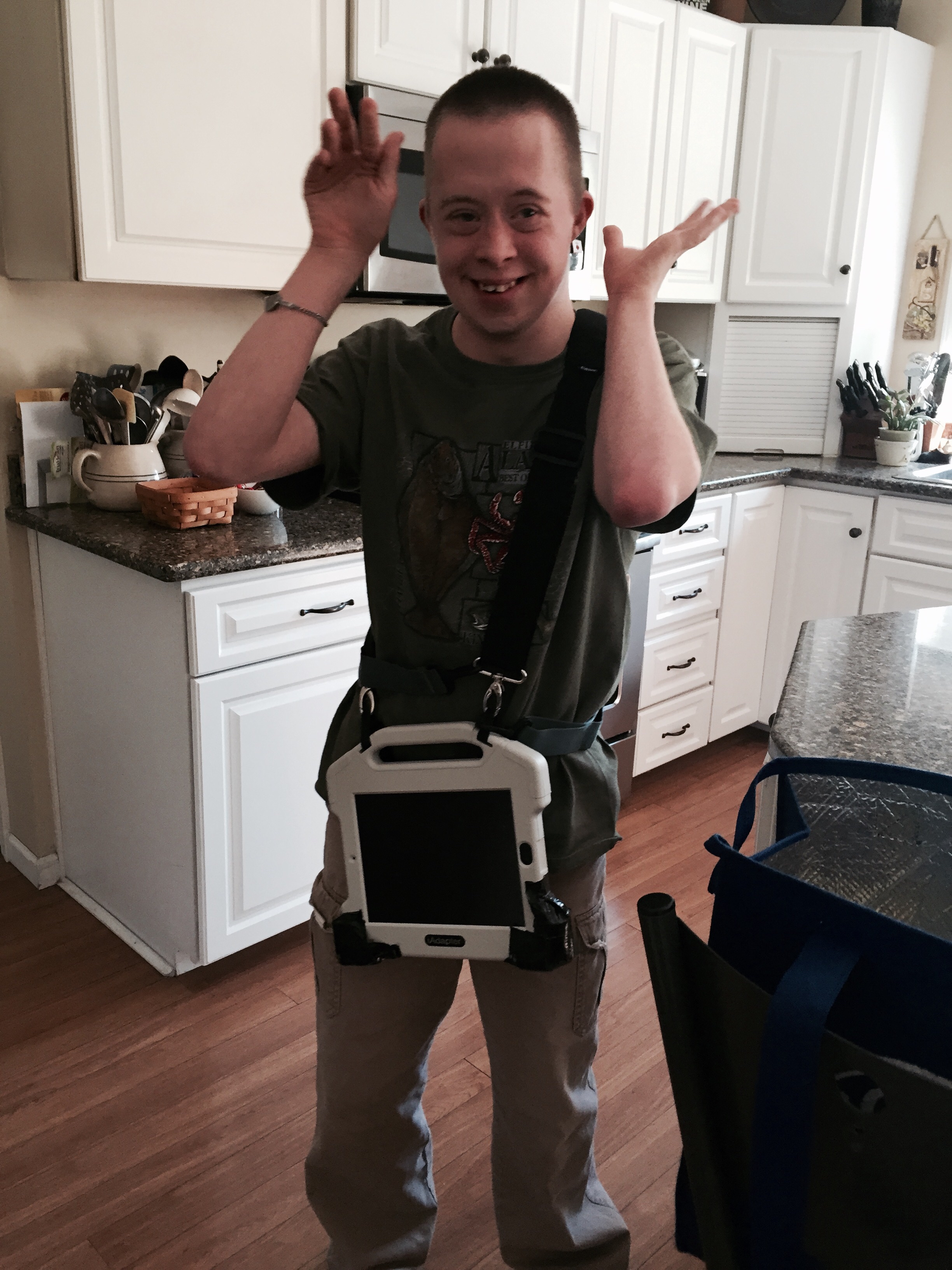
Since the SETT meetings, Nick has been using an iPad with and iAdapter case. The program installed is called, Touch Chat. The initial update I gave on this device is in the archives posted on 5/18/15.   We had a few goals in mind. One was to be able to request items like food, movies, music, going out into the community. Secondly we wanted Nick to use the talker to gain attention appropriately. Finally, we hoped that Nick would be able to express his feelings (happy, angry, and frustrated).

Nick has been requesting food items very well along with items of interest to him like tennis balls, sprite, music, people he wants to see, tired etc.. on a consistent basis. In addition, he has been using it to gain attention. When he burps or farts he pushes the “excuse me” or “that’s gross”. If you try and find a certain button on his talker, he will hit “excuse me” as if to say, back off this device is mine. Last week he pushed the button with a keyboard on it. He wanted me to know he had played the keyboard at school that day.

Brian, his private speech therapists spends a lot of time working with Nick and his AAC device. The two go trolling around the speech clinic looking for ladies. Brian added a new button which Nick has been pushing, “You look pretty today, hubba-hubba!” That one has been a big hit 🙂

Nick’s talker, note the bumper pads the team installed.  Nick likes to send it airborne on occasion 🙂

IMG_5231

Last week, there was a major breakthrough with Nick using his talker. One trigger that often leads to a major meltdown for Nick is a crying baby or child. He will begin to pinch himself on his cheeks, followed by pinching anyone near him when this happens. This happened at an airport, leading to a severe meltdown the summer before last. While on a community trip at IHOP on Friday, a child began to cry at a table near them and Nick began to pinch himself. His teacher pointed to the talker instructing Nick to use it. Nick immediately took it and began to push the “stop” button. The first two times he hit the stop button the child stopped screaming. The look on Nick’s face was priceless. It might have been just a coincidence, but in that moment Nick realized using the talker really does work. His teacher cheered and praised him. He was so proud. It was as if he realized that he had power over the situation.

Yay Nick!!!
IMG_5116

It reminds me of many years ago, when the staff got trained to use PECS with Nick. His world of limited speech left him frustrated in those days during puberty. This resulted in many horrific meltdowns.  Using the PECS pictures gave him power; it gave him a voice (much like the talker is starting to do now). The key to the AAC device being successful will be getting everybody on board. Everyone that works with Nick needs to encourage him to use it (and praise him when he does). I look forward to sharing more of his successes with the talker and building on to this. I know he has much more to tell us all. That’s what is in my noggin this week.

~Teresa 🙂


Posted in Augmentative and Alternative Communication (AAC), Autism, Down syndrome, Education and Special Needs

Blog #115~SETT to Talk

Blog #115~SETT to Talk  

For the past few weeks, I’ve been writing about the SETT meeting process.  Recently, we did a SETT meeting at Nick’s school to re-evaluate the device he uses to communicate. This is called an Augmentative and Alternative Communication device (AAC). Nick is 21 years old and has Down syndrome and autism.

SETT is an acronym for Student, Environment, Task and Tools. The team gathered to ask key questions and get information that will help to pinpoint what technologies would best suit the student.

S= Student (abilities, learning styles, concerns)

E= Environment (What places will the talker be used and how)

T=Tasks (What type of work and learning will the student be doing?)

T=Tools (What tools are needed on the device to make it a success for Nick?)

photo (120)

In Blog #114, I covered Nick’s abilities, learning style, needs and concerns.  The last three areas we brainstormed on were the Nick’s environment, tasks that we wanted Nick to be able to do on the talker and what tools would be needed to make this a success. Take a look at what the team came up with in these areas: 

Environment: 

* Uses a “change” visual

* PECS book at home – items to request, pictures of people, task strips

* Private SLP services – 1:1 for speech and occupational therapy

* Video modeling strategy successful

* Attends ESY (Extended School Year-summer school)

* Bowling, mall, library, out to lunch

* Church

* Job: delivery run to CEC for STEPS

* Shopping at Meijer and Wal-Mart

* Goes to movies, lunch/breakfast, and the park

*Has a respite worker at home

* Production class: shredding, sorting, bagging, cleaning

*Visits to family – grandparents, aunt and uncle

*Older brother, Hank, attends NIU

*Cooking

* Functional reading and math

* Yoga

* Dance party Fridays

* Uses classroom leisure choice board independently

* Small group or 1:1 instruction, especially for unfamiliar tasks

* Adult supervision for safety

* Visual supports

* Cues to stay on task for jobs he knows

* Needs to know expectations, both visually and auditorally- what to do, how many to   do, how many are left

* Does visual schedule for the day

* Benefits from hand‐over‐hand and modeling for fine motor tasks

* Looks for peer models

* Task strip for hygiene routines, with point  prompts, at home

* Visual learner

* Flexible with symbol sets – familiar with PCS, SymbolStix, Proloquo2Go

* 15 buttons on current AAC home page

* Uses visual support to order at restaurants instead of his AAC device

Picture14

Tasks: 

*“That’s gross”

* “I like that”, “I don’t like that”

* “That’s crazy”

* Flirting

* Gain attention

*Need help

* “Stop”

* “I need a break”

* Emotions

* Preferred items and activities

* Requesting

* Sharing his humor

* Order at restaurants

* Communicate what’s bothering him

* Sensory vocabulary – “hot”, “loud”, “crowded”

* “Where is the fire alarm?”

* “I’m tired”

* “I’m mad”

* Ask questions

* Share personal information

*Basic needs – bathroom, drink/thirsty, hungry

* Greetings

* Age‐appropriate vocabulary

* Comments

* Weather and calendar vocabulary

* Names – People past and present

The team looked at what tools would be needed on the device that would work for Nick.  Each member could choose the top three most important aspects to focus on in particular (these have 3 *** by them):

IMG_4318

Tools:

* Portable

* Shoulder or waist strap

* Durable

* Waterproof

* Loud enough for all environments

* Ability to add vocabulary

* Combination of single words and phrases***

* Import photographs

* Easy to program

* Ability to program on the fly

* 7‐8” screen size

* Sturdy case (“bounceproof”)****

* Quick and consistent response from AAC device***

* Category‐based******

* 2‐3 hits to communicate message**

* Online tech support

*Cloud or USB backup

* Warranty

* Cost

*Dedicated communication device

* Ability to hide buttons

* 8‐12 buttons per page

* Keyboard‐sized buttons or larger

*Long battery life

* 1 charger for whole system

* No replacing batteries

The SETT process was enlightening.  The team covered a lot of ground in looking at many aspects of communication for Nick.   As you can see, there are so many things to consider when looking into a voice output device.  Nick just got his new AAC device last Thursday.  I can’t wait to share with you how he is navigating it!  That’s what is in my noggin this week!

~Teresa 🙂